Wednesday, 10 October 2012

Photoscape 3.6.2


Photoscape is a fun and easy photo editing software that enables you to fix and enhance photos.

Key Features
  • Viewer: View photos in your folder, create a slideshow
  • Editor: resizing, brightness and color adjustment, white balance, backlight correction, frames, balloons, mosaic mode, adding text, drawing pictures, cropping, filters, red eye removal, blooming, 
  • Batch editor: Batch edit multiple photos
  • Page: Merge multiple photos on the page frame to create one final photo
  • Combine: Attach multiple photos vertically or horizontally to create one final photo
  • Animated GIF: Use multiple photos to create a final animated photo
  • Print: Print portrait shots, carte de visites(CDV), passport photos
  • Splitter: Slice a photo into several pieces
  • Screen Capture: Capture your screenshot and save it
  • Color Picker: Zoom in on images, search and pick a color
  • Rename: Change photo file names in batch mode
  • Raw Converter: Convert RAW to JPG
  • Paper Print: Print lined, graph, music and calendar paper
  • Face Search: Find similar faces on the Internet

Windows Media Player Firefox Plugin


My Phone Explorer 1.8.4


New Features:

  • Bidirektional filesync with the phone
  • Join contacts (select 2-5 contacts -> rightclick and in the sync confirmation window)
  • Sync with Outlook is faster and without security alert (NOT for Outlook 64bit), you can select multiple Outlook calendars to sync
  • Sync with Lotus Notes: more fields, rule exceptions are supported
  • Filebrowser enhanced (new: move and rename files, better management of the external storage)
  • Revised contact-edit-window
  • some changes in the calendar GUI
  • print feature for calls
  • enhanced "Control phone"
  • Ping-SMS does work for all phones (earlier versions only HTC)
  • some smaller changes and many bugfixes

Super Copier


A powerful file copier

SuperCopier is a system tool that aims to significantly reduce time when you are copying or moving files. It definitely comes in handy when you are dealing with large files, and when Windows' copy and cut functions are simply not enough anymore.


After the quick installation is complete, you can access SuperCopier in the system tray. Unfortunately, the application does not integrate in the context menu, so you have to select "new thread" every time you want to use SuperCopier.

As far as actions are concerned, you can opt for Copy or Move operations. In order to initiate any of those, you need to drag and drop the files to be processed and select the destination folder.

SuperCopier’s interface is always on top of other programs, except when it’s minimized to tray. It notifies you when a task is complete, but it doesn’t state the amount of time it took (just the speed). The current jobs can be monitored from the Thread List section.

In addition, you can configure SuperCopier in matter of appearance (foreground, background, text and border colors), speed limit for copying and moving, time to wait between two retries, and others.

Our test was done on a 4.94 GB folder, and run on Windows 7. In the case of SuperCopier vs Windows, Windows won! SuperCopier took 4 minutes and 11 seconds to copy the file, while Windows took only 3 minutes and 14 seconds. Hopefully, the application makes a better impression on previous Windows systems.

All in all, SuperCopier brings a different file copying / moving experience. But it does not surpass Windows’ 7 speed.

My Lan Viewer 4.12 + Key


MyLanViewer Network/IP Scanner 
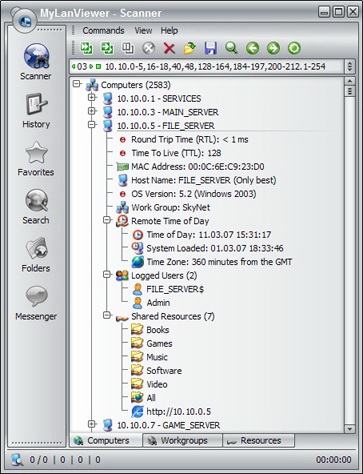
MyLanViewer Network/IP Scanner is a powerful Netbios and LAN/Network IP address scanner for Windows, whois and traceroute tool, remote shutdown and Wake On LAN (WOL) manager, wireless network scanner and monitor. This application will help you find all IP addresses, MAC addresses and shared folders of computers on your wired or wireless (Wi-Fi) network. The program scans network and displays your network computers in an easy to read, buddy-list style window that provides the computer name, IP address, MAC address, NIC vendor, OS version, logged users, shared folders and other technical details for each computer.
MyLanViewer Network/IP Scanner supports remote shutdown, wake-on-lan, lock workstation, log off, sleep, hibernate, reboot and power off. It is able to monitor IP address and show notifications when the states of some computers change. MyLanViewer Network/IP Scanner can also view and access shared folders, terminate user sessions, disable shared folders, show netstat information and detect rogue DHCP servers. The software can monitor all devices (even hidden) on your subnet, and show notifications when the new devices will be found (for example, to know who is connected to your WiFi router or wireless network). The program easy to install and use, and has a user-friendly and beautiful interface. 

System requirements:
Windows 2000, XP, 2003, Vista, 7, 2008, 8. 32-bit or 64-bit. Net Framework is not required.


Vypress Chat 2.1.7 + Crack


Gmail Drive


GMail Drive creates a virtual filesystem around your Google Mail account, allowing you to use Gmail as a storage medium.

GMail Drive creates a virtual filesystem on top of your Google Gmail account and enables you to save and retrieve files stored on your Gmail account directly from inside Windows Explorer. GMail Drive literally adds a new drive to your computer under the My Computer folder, where you can create new folders, copy and drag'n'drop files to it.
Ever since Google started to offer users a Gmail e-mail account, which includes storage space of 6000 megabytes, you have had plenty of storage space but not a lot to fill it up with. With GMail Drive you can easily copy files to your Google Mail Account and retrieve them again.
When you create a new file using GMail Drive, it generates an e-mail and posts it to your account. The e-mail appears in your normal Inbox folder, and the file is attached as an e-mail attachment. GMail Drive periodically checks your mail account (using the Gmail search function) to see if new files have arrived and to rebuild the directory structures. But basically GMail Drive acts as any other hard-drive installed on your computer.

Contact Us

Name

Email *

Message *